
|
|
#81
 01-14-2012, 01:57 AM
|
|||
|
|||

I like this patch,especially with all the new planes,etc,but have one problem.I can't see the skins for the Fw190A4 1.42ATA.I made new folders but none of them work.What would the skins folder be labeled?Thanks.

|
|
#82
01-14-2012, 01:59 AM
|
|||
|
|||
|
I haven't tested, but I suspect you probably have to warm up the corsair to operating temp now! I mean if they looked at overheat, they probably looked at the other end. Have some faith in their knowledge and abilities.

|
|
#83
01-14-2012, 02:07 AM
|
|||
|
|||
|
I just experienced my first CTD in a single player campaign. Was coming up behind a MiG3 that was enroute to a bridge bombing and when I opened fire from my F2 and scored a few hits, I immediately recieved a CTD.
Unexpected Signal : EXCEPTION_ACCESS_VIOLATION occurred at PC=0x6d4386f1 Function name=(N/A) Library=C:\Program Files (x86)\Ubisoft\IL-2 Sturmovik 1946\bin\hotspot\jvm.dll NOTE: We are unable to locate the function name symbol for the error just occurred. Please refer to release documentation for possible reason and solutions. Current Java thread: at com.maddox.il2.ai.air.Pilot.doFighterDefense(Nativ e Method) at com.maddox.il2.ai.air.Pilot.fighterDefence(Pilot.j ava:1103) at com.maddox.il2.ai.air.Pilot.setManeuverByTask(Pilo t.java:551) at com.maddox.il2.ai.air.Pilot.setTaskAndManeuver(Pil ot.java:409) at com.maddox.il2.ai.air.Pilot.update(Pilot.java:185) at com.maddox.il2.fm.FlightModelMain.tick(FlightModel Main.java:1023) at com.maddox.il2.engine.Interpolators.tick(Interpola tors.java:222) at com.maddox.il2.engine.Actor.interpolateTick(Actor. java:434) at com.maddox.il2.engine.InterpolateAdapter.msgTimeOu t(InterpolateAdapter.java:174) at com.maddox.rts.MsgTimeOut.invokeListener(MsgTimeOu t.java:73) at com.maddox.rts.Message._send(Message.java:1217) at com.maddox.rts.Message.sendToObject(Message.java:1 191) at com.maddox.rts.Message.sendTo(Message.java:1134) at com.maddox.rts.Message.trySend(Message.java:1115) at com.maddox.rts.Time.loopMessages(Time.java:252) at com.maddox.rts.RTSConf.loopMsgs(RTSConf.java:101) at com.maddox.il2.game.MainWin3D.loopApp(MainWin3D.ja va:131) at com.maddox.il2.game.Main.exec(Main.java:439) at com.maddox.il2.game.GameWin3D.main(GameWin3D.java: 235) Dynamic libraries: 0x00400000 - 0x01EA3000 C:\Program Files (x86)\Ubisoft\IL-2 Sturmovik 1946\il2fb.exe 0x77380000 - 0x77500000 C:\Windows\SysWOW64\ntdll.dll 0x76370000 - 0x76480000 C:\Windows\syswow64\kernel32.dll 0x75CF0000 - 0x75D36000 C:\Windows\syswow64\KERNELBASE.dll 0x64D00000 - 0x64D31000 C:\Program Files\Alwil Software\Avast5\snxhk.dll 0x75C20000 - 0x75CC0000 C:\Windows\syswow64\ADVAPI32.dll 0x76A10000 - 0x76ABC000 C:\Windows\syswow64\msvcrt.dll 0x768F0000 - 0x76909000 C:\Windows\SysWOW64\sechost.dll 0x76280000 - 0x76370000 C:\Windows\syswow64\RPCRT4.dll 0x74A60000 - 0x74AC0000 C:\Windows\syswow64\SspiCli.dll 0x74A50000 - 0x74A5C000 C:\Windows\syswow64\CRYPTBASE.dll 0x64EC0000 - 0x64EE5000 C:\Windows\system32\DINPUT.dll 0x76910000 - 0x76A10000 C:\Windows\syswow64\USER32.dll 0x75990000 - 0x75A20000 C:\Windows\syswow64\GDI32.dll 0x74D30000 - 0x74D3A000 C:\Windows\syswow64\LPK.dll 0x76790000 - 0x7682D000 C:\Windows\syswow64\USP10.dll 0x72020000 - 0x72052000 C:\Windows\system32\WINMM.dll 0x76890000 - 0x768F0000 C:\Windows\syswow64\IMM32.dll 0x766C0000 - 0x7678C000 C:\Windows\syswow64\MSCTF.dll 0x6D420000 - 0x6D4EF000 C:\Program Files (x86)\Ubisoft\IL-2 Sturmovik 1946\bin\hotspot\jvm.dll 0x72860000 - 0x728AC000 C:\Windows\system32\apphelp.dll 0x6D220000 - 0x6D227000 C:\Program Files (x86)\Ubisoft\IL-2 Sturmovik 1946\bin\hpi.dll 0x6D3B0000 - 0x6D3BD000 C:\Program Files (x86)\Ubisoft\IL-2 Sturmovik 1946\bin\verify.dll 0x6D250000 - 0x6D266000 C:\Program Files (x86)\Ubisoft\IL-2 Sturmovik 1946\bin\java.dll 0x6D3C0000 - 0x6D3CD000 C:\Program Files (x86)\Ubisoft\IL-2 Sturmovik 1946\bin\zip.dll 0x6CB80000 - 0x6CB94000 C:\Program Files (x86)\Ubisoft\IL-2 Sturmovik 1946\DT.dll 0x10000000 - 0x1000A000 C:\Program Files (x86)\Ubisoft\IL-2 Sturmovik 1946\pathfind.dll 0x10010000 - 0x12ED6000 C:\Program Files (x86)\Ubisoft\IL-2 Sturmovik 1946\il2_core.dll 0x7C340000 - 0x7C396000 C:\Program Files (x86)\Ubisoft\IL-2 Sturmovik 1946\MSVCR71.dll 0x0F830000 - 0x0F853000 C:\Program Files (x86)\Ubisoft\IL-2 Sturmovik 1946\jgl.dll 0x0FF70000 - 0x0FFAA000 C:\Program Files (x86)\Ubisoft\IL-2 Sturmovik 1946\il2_usgs2.dll 0x75BA0000 - 0x75BD5000 C:\Windows\syswow64\WS2_32.dll 0x75EE0000 - 0x75EE6000 C:\Windows\syswow64\NSI.dll 0x13520000 - 0x13597000 C:\Program Files (x86)\Ubisoft\IL-2 Sturmovik 1946\mg_snd_sse.dll 0x64EF0000 - 0x64F20000 C:\Windows\system32\dinput8.dll 0x64EA0000 - 0x64EA9000 C:\Windows\system32\HID.DLL 0x75D40000 - 0x75EDD000 C:\Windows\syswow64\SETUPAPI.DLL 0x75BE0000 - 0x75C07000 C:\Windows\syswow64\CFGMGR32.dll 0x75B10000 - 0x75B9F000 C:\Windows\syswow64\OLEAUT32.dll 0x760C0000 - 0x7621C000 C:\Windows\syswow64\ole32.dll 0x74AC0000 - 0x74AD2000 C:\Windows\syswow64\DEVOBJ.dll 0x75CC0000 - 0x75CED000 C:\Windows\syswow64\WINTRUST.dll 0x75FA0000 - 0x760BD000 C:\Windows\syswow64\CRYPT32.dll 0x75A20000 - 0x75A2C000 C:\Windows\syswow64\MSASN1.dll 0x6F4F0000 - 0x6F570000 C:\Windows\system32\uxtheme.dll 0x6D340000 - 0x6D348000 C:\Program Files (x86)\Ubisoft\IL-2 Sturmovik 1946\bin\net.dll 0x73390000 - 0x73397000 C:\Windows\system32\WSOCK32.dll 0x72C50000 - 0x72C60000 C:\Windows\system32\NLAapi.dll 0x72C40000 - 0x72C50000 C:\Windows\system32\napinsp.dll 0x72C20000 - 0x72C32000 C:\Windows\system32\pnrpnsp.dll 0x72BF0000 - 0x72C17000 C:\Program Files (x86)\Common Files\Microsoft Shared\Windows Live\WLIDNSP.DLL 0x77350000 - 0x77355000 C:\Windows\syswow64\PSAPI.DLL 0x76830000 - 0x76887000 C:\Windows\syswow64\SHLWAPI.dll 0x72C60000 - 0x72C9C000 C:\Windows\System32\mswsock.dll 0x72BA0000 - 0x72BE4000 C:\Windows\system32\DNSAPI.dll 0x72B90000 - 0x72B98000 C:\Windows\System32\winrnr.dll 0x72B60000 - 0x72B81000 C:\Program Files (x86)\Bonjour\mdnsNSP.dll 0x72B40000 - 0x72B5C000 C:\Windows\system32\Iphlpapi.DLL 0x72B30000 - 0x72B37000 C:\Windows\system32\WINNSI.DLL 0x6EFC0000 - 0x6F088000 C:\Windows\system32\Opengl32.dll 0x72330000 - 0x72352000 C:\Windows\system32\GLU32.dll 0x6EED0000 - 0x6EFB7000 C:\Windows\system32\DDRAW.dll 0x728C0000 - 0x728C6000 C:\Windows\system32\DCIMAN32.dll 0x6F490000 - 0x6F4A3000 C:\Windows\system32\dwmapi.dll 0x135A0000 - 0x135D4000 C:\Program Files (x86)\Ray Adams\ATI Tray Tools\raphook.dll 0x74D40000 - 0x7598A000 C:\Windows\syswow64\SHELL32.dll 0x73430000 - 0x734D3000 C:\Windows\WinSxS\x86_microsoft.vc90.crt_1fc8b3b9a 1e18e3b_9.0.30729.6161_none_50934f2ebcb7eb57\MSVCR 90.dll 0x64EB0000 - 0x64EB7000 C:\Windows\system32\atiglpxx.dll 0x69030000 - 0x6A2C6000 C:\Windows\system32\atioglxx.dll 0x73380000 - 0x73389000 C:\Windows\system32\VERSION.dll 0x73FA0000 - 0x74063000 C:\Windows\system32\aticfx32.dll 0x64950000 - 0x649AE000 C:\Windows\system32\atiadlxy.dll 0x71D70000 - 0x71D87000 C:\Windows\system32\USERENV.dll 0x72AC0000 - 0x72ACB000 C:\Windows\system32\profapi.dll 0x72D90000 - 0x72D9D000 C:\Windows\system32\WTSAPI32.dll 0x64E90000 - 0x64E9B000 C:\Windows\system32\atigktxx.dll 0x740B0000 - 0x74122000 C:\Windows\system32\dsound.dll 0x724B0000 - 0x724D5000 C:\Windows\system32\POWRPROF.dll 0x75A30000 - 0x75AB3000 C:\Windows\syswow64\CLBCatQ.DLL 0x74260000 - 0x74299000 C:\Windows\System32\MMDevApi.dll 0x74500000 - 0x745F5000 C:\Windows\System32\PROPSYS.dll 0x741D0000 - 0x74206000 C:\Windows\system32\AUDIOSES.DLL 0x74210000 - 0x74217000 C:\Windows\system32\avrt.dll 0x75EF0000 - 0x75F1A000 C:\Windows\syswow64\imagehlp.dll 0x73290000 - 0x7337B000 C:\Windows\syswow64\dbghelp.dll Local Time = Fri Jan 13 21:56:02 2012 Elapsed Time = 1658 # # HotSpot Virtual Machine Error : EXCEPTION_ACCESS_VIOLATION # Error ID : 4F530E43505002CC # Please report this error at # http://java.sun.com/cgi-bin/bugreport.cgi # # Java VM: Java HotSpot(TM) Client VM (1.3.1-b24 compiled mode) #
|
|
#84
01-14-2012, 04:31 AM
|
|||
|
|||
|
Second crash, was rolling in on a Lagg that I had been fighting for awhile for some low 6 shots in the wingroot, and had not yet opened fire.
Loving the new AI nonetheless, its unpredictable and fluid. Makes it much harder to tell "Welp, he's doing the climb to the stratosphere thing!" or "welp, he's doing that damn roll thing again!" and counter with the same static tactic. Log is as follows: Unexpected Signal : EXCEPTION_ACCESS_VIOLATION occurred at PC=0x6d4386f1 Function name=(N/A) Library=C:\Program Files (x86)\Ubisoft\IL-2 Sturmovik 1946\bin\hotspot\jvm.dll NOTE: We are unable to locate the function name symbol for the error just occurred. Please refer to release documentation for possible reason and solutions. Current Java thread: at com.maddox.il2.ai.air.Pilot.doFighterDefense(Nativ e Method) at com.maddox.il2.ai.air.Pilot.fighterDefence(Pilot.j ava:1103) at com.maddox.il2.ai.air.Pilot.setManeuverByTask(Pilo t.java:551) at com.maddox.il2.ai.air.Pilot.setTaskAndManeuver(Pil ot.java:409) at com.maddox.il2.ai.air.Pilot.update(Pilot.java:185) at com.maddox.il2.fm.FlightModelMain.tick(FlightModel Main.java:1023) at com.maddox.il2.engine.Interpolators.tick(Interpola tors.java:222) at com.maddox.il2.engine.Actor.interpolateTick(Actor. java:434) at com.maddox.il2.engine.InterpolateAdapter.msgTimeOu t(InterpolateAdapter.java:174) at com.maddox.rts.MsgTimeOut.invokeListener(MsgTimeOu t.java:73) at com.maddox.rts.Message._send(Message.java:1217) at com.maddox.rts.Message.sendToObject(Message.java:1 191) at com.maddox.rts.Message.sendTo(Message.java:1134) at com.maddox.rts.Message.trySend(Message.java:1115) at com.maddox.rts.Time.loopMessages(Time.java:252) at com.maddox.rts.RTSConf.loopMsgs(RTSConf.java:101) at com.maddox.il2.game.MainWin3D.loopApp(MainWin3D.ja va:131) at com.maddox.il2.game.Main.exec(Main.java:439) at com.maddox.il2.game.GameWin3D.main(GameWin3D.java: 235) Dynamic libraries: 0x00400000 - 0x01EA3000 C:\Program Files (x86)\Ubisoft\IL-2 Sturmovik 1946\il2fb.exe 0x77380000 - 0x77500000 C:\Windows\SysWOW64\ntdll.dll 0x76370000 - 0x76480000 C:\Windows\syswow64\kernel32.dll 0x75CF0000 - 0x75D36000 C:\Windows\syswow64\KERNELBASE.dll 0x64D00000 - 0x64D31000 C:\Program Files\Alwil Software\Avast5\snxhk.dll 0x75C20000 - 0x75CC0000 C:\Windows\syswow64\ADVAPI32.dll 0x76A10000 - 0x76ABC000 C:\Windows\syswow64\msvcrt.dll 0x768F0000 - 0x76909000 C:\Windows\SysWOW64\sechost.dll 0x76280000 - 0x76370000 C:\Windows\syswow64\RPCRT4.dll 0x74A60000 - 0x74AC0000 C:\Windows\syswow64\SspiCli.dll 0x74A50000 - 0x74A5C000 C:\Windows\syswow64\CRYPTBASE.dll 0x69890000 - 0x698B5000 C:\Windows\system32\DINPUT.dll 0x76910000 - 0x76A10000 C:\Windows\syswow64\USER32.dll 0x75990000 - 0x75A20000 C:\Windows\syswow64\GDI32.dll 0x74D30000 - 0x74D3A000 C:\Windows\syswow64\LPK.dll 0x76790000 - 0x7682D000 C:\Windows\syswow64\USP10.dll 0x72020000 - 0x72052000 C:\Windows\system32\WINMM.dll 0x76890000 - 0x768F0000 C:\Windows\syswow64\IMM32.dll 0x766C0000 - 0x7678C000 C:\Windows\syswow64\MSCTF.dll 0x6D420000 - 0x6D4EF000 C:\Program Files (x86)\Ubisoft\IL-2 Sturmovik 1946\bin\hotspot\jvm.dll 0x72860000 - 0x728AC000 C:\Windows\system32\apphelp.dll 0x6D220000 - 0x6D227000 C:\Program Files (x86)\Ubisoft\IL-2 Sturmovik 1946\bin\hpi.dll 0x6D3B0000 - 0x6D3BD000 C:\Program Files (x86)\Ubisoft\IL-2 Sturmovik 1946\bin\verify.dll 0x6D250000 - 0x6D266000 C:\Program Files (x86)\Ubisoft\IL-2 Sturmovik 1946\bin\java.dll 0x6D3C0000 - 0x6D3CD000 C:\Program Files (x86)\Ubisoft\IL-2 Sturmovik 1946\bin\zip.dll 0x6CB80000 - 0x6CB94000 C:\Program Files (x86)\Ubisoft\IL-2 Sturmovik 1946\DT.dll 0x10000000 - 0x1000A000 C:\Program Files (x86)\Ubisoft\IL-2 Sturmovik 1946\pathfind.dll 0x10010000 - 0x12ED6000 C:\Program Files (x86)\Ubisoft\IL-2 Sturmovik 1946\il2_core.dll 0x7C340000 - 0x7C396000 C:\Program Files (x86)\Ubisoft\IL-2 Sturmovik 1946\MSVCR71.dll 0x0F860000 - 0x0F883000 C:\Program Files (x86)\Ubisoft\IL-2 Sturmovik 1946\jgl.dll 0x0FFA0000 - 0x0FFDA000 C:\Program Files (x86)\Ubisoft\IL-2 Sturmovik 1946\il2_usgs2.dll 0x75BA0000 - 0x75BD5000 C:\Windows\syswow64\WS2_32.dll 0x75EE0000 - 0x75EE6000 C:\Windows\syswow64\NSI.dll 0x133B0000 - 0x13427000 C:\Program Files (x86)\Ubisoft\IL-2 Sturmovik 1946\mg_snd_sse.dll 0x6CEF0000 - 0x6CF20000 C:\Windows\system32\dinput8.dll 0x724E0000 - 0x724E9000 C:\Windows\system32\HID.DLL 0x75D40000 - 0x75EDD000 C:\Windows\syswow64\SETUPAPI.DLL 0x75BE0000 - 0x75C07000 C:\Windows\syswow64\CFGMGR32.dll 0x75B10000 - 0x75B9F000 C:\Windows\syswow64\OLEAUT32.dll 0x760C0000 - 0x7621C000 C:\Windows\syswow64\ole32.dll 0x74AC0000 - 0x74AD2000 C:\Windows\syswow64\DEVOBJ.dll 0x75CC0000 - 0x75CED000 C:\Windows\syswow64\WINTRUST.dll 0x75FA0000 - 0x760BD000 C:\Windows\syswow64\CRYPT32.dll 0x75A20000 - 0x75A2C000 C:\Windows\syswow64\MSASN1.dll 0x6F4F0000 - 0x6F570000 C:\Windows\system32\uxtheme.dll 0x6D340000 - 0x6D348000 C:\Program Files (x86)\Ubisoft\IL-2 Sturmovik 1946\bin\net.dll 0x73390000 - 0x73397000 C:\Windows\system32\WSOCK32.dll 0x72C50000 - 0x72C60000 C:\Windows\system32\NLAapi.dll 0x72C40000 - 0x72C50000 C:\Windows\system32\napinsp.dll 0x72C20000 - 0x72C32000 C:\Windows\system32\pnrpnsp.dll 0x72BF0000 - 0x72C17000 C:\Program Files (x86)\Common Files\Microsoft Shared\Windows Live\WLIDNSP.DLL 0x77350000 - 0x77355000 C:\Windows\syswow64\PSAPI.DLL 0x76830000 - 0x76887000 C:\Windows\syswow64\SHLWAPI.dll 0x72C60000 - 0x72C9C000 C:\Windows\System32\mswsock.dll 0x72BA0000 - 0x72BE4000 C:\Windows\system32\DNSAPI.dll 0x72B90000 - 0x72B98000 C:\Windows\System32\winrnr.dll 0x72B60000 - 0x72B81000 C:\Program Files (x86)\Bonjour\mdnsNSP.dll 0x72B40000 - 0x72B5C000 C:\Windows\system32\Iphlpapi.DLL 0x72B30000 - 0x72B37000 C:\Windows\system32\WINNSI.DLL 0x6EFC0000 - 0x6F088000 C:\Windows\system32\Opengl32.dll 0x72330000 - 0x72352000 C:\Windows\system32\GLU32.dll 0x6EED0000 - 0x6EFB7000 C:\Windows\system32\DDRAW.dll 0x728C0000 - 0x728C6000 C:\Windows\system32\DCIMAN32.dll 0x6F490000 - 0x6F4A3000 C:\Windows\system32\dwmapi.dll 0x14F30000 - 0x14F64000 C:\Program Files (x86)\Ray Adams\ATI Tray Tools\raphook.dll 0x74D40000 - 0x7598A000 C:\Windows\syswow64\SHELL32.dll 0x73430000 - 0x734D3000 C:\Windows\WinSxS\x86_microsoft.vc90.crt_1fc8b3b9a 1e18e3b_9.0.30729.6161_none_50934f2ebcb7eb57\MSVCR 90.dll 0x724F0000 - 0x724F7000 C:\Windows\system32\atiglpxx.dll 0x15450000 - 0x166E6000 C:\Windows\system32\atioglxx.dll 0x73380000 - 0x73389000 C:\Windows\system32\VERSION.dll 0x73FA0000 - 0x74063000 C:\Windows\system32\aticfx32.dll 0x697D0000 - 0x6982E000 C:\Windows\system32\atiadlxy.dll 0x71D70000 - 0x71D87000 C:\Windows\system32\USERENV.dll 0x72AC0000 - 0x72ACB000 C:\Windows\system32\profapi.dll 0x72D90000 - 0x72D9D000 C:\Windows\system32\WTSAPI32.dll 0x6F2D0000 - 0x6F2DB000 C:\Windows\system32\atigktxx.dll 0x740B0000 - 0x74122000 C:\Windows\system32\dsound.dll 0x724B0000 - 0x724D5000 C:\Windows\system32\POWRPROF.dll 0x75A30000 - 0x75AB3000 C:\Windows\syswow64\CLBCatQ.DLL 0x74260000 - 0x74299000 C:\Windows\System32\MMDevApi.dll 0x74500000 - 0x745F5000 C:\Windows\System32\PROPSYS.dll 0x741D0000 - 0x74206000 C:\Windows\system32\AUDIOSES.DLL 0x74210000 - 0x74217000 C:\Windows\system32\avrt.dll 0x75EF0000 - 0x75F1A000 C:\Windows\syswow64\imagehlp.dll 0x73290000 - 0x7337B000 C:\Windows\syswow64\dbghelp.dll Local Time = Sat Jan 14 00:27:33 2012 Elapsed Time = 1663 # # HotSpot Virtual Machine Error : EXCEPTION_ACCESS_VIOLATION # Error ID : 4F530E43505002CC # Please report this error at # http://java.sun.com/cgi-bin/bugreport.cgi # # Java VM: Java HotSpot(TM) Client VM (1.3.1-b24 compiled mode) #
|
|
#86
01-14-2012, 10:50 AM
|
|||
|
|||
|
First of all, great patch love it, no crashes as of yet.
Now, to my little problem. When browsing through the QMB I found out that when RAF, RAAF or RN is selected, and you choose the I-250, US markings appear (this also applies not only for the arming screen, but also when a mission is launched), please note that I haven't played with the I-250 for awhile so I'm not entirely sure if this is a new bug or not, if it is an old bug, please forgive me. 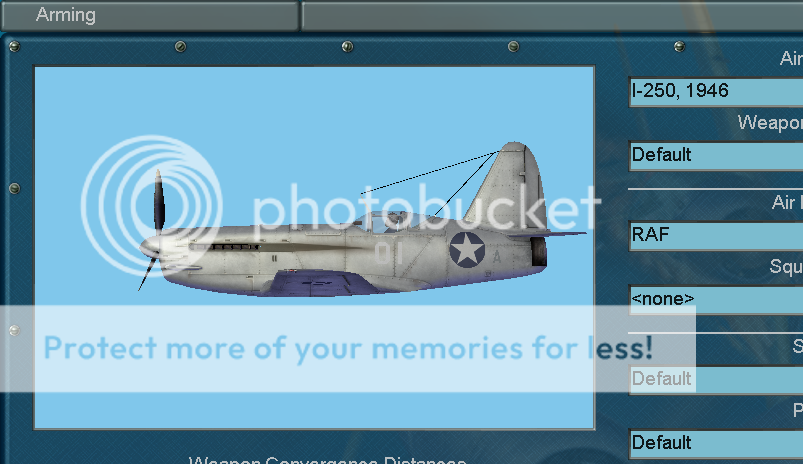
|
|
#87
01-14-2012, 10:51 AM
|
|||
|
|||
|
Those wanting to discuss the F4U FM do so in the dedicated thread please.
http://forum.1cpublishing.eu/showthread.php?t=29082 Mods could you move the posts in this thread that relate to F4U to the new thread please ? Last edited by IvanK; 01-14-2012 at 10:58 AM.
|
|
#90
01-14-2012, 11:20 AM
|
||||
|
||||
|
Quote:
Same type of crash. QMB I was flying Fw190A-4 1.65 ATA with 3 wingmen + 2xFw190A-4 + 2xFw190A-4 against 3xPe8 +3xPe8 +3xPe8 +4xYak-9 on the Slovakia map summer Russians started out @3000m and Germans @5000m
__________________
Windows 7 Pro 64 bit EN Intel Core 2 Duo E8400 (2x3GHz), 8GB RAM ATI 7970, Intel X-25M SSD EAF331 are recruting. We are a nordic Sqd (Norway, Sweeden, Finland, Denmark) within European Airforce. www.europeanaf.org . Please pm me if you are interested.
|
 |
| Thread Tools | |
| Display Modes | |
|
|


 Linear Mode

