
|
|
|||||||
| IL-2 Sturmovik The famous combat flight simulator. |
 |
|
|
Thread Tools | Display Modes |
|
|
|
#1
 03-09-2009, 05:27 PM
|
|||
|
|||

Quote:
 Heres a copy of the letter I sent them...... Heres a copy of the letter I sent them......"Hi there. Ok, I bought the retail version of Empire:Total War and tried to install it but could not, getting an error message saying "Failed to run install script". After many attempts, I decided to activate the game on steam which then resulted in me downloading it, which took about a day! I now have it installed, have verifed integrity of game cache (Size 15091mb) and defragmented....but on trying to launch I get a message saying "Empire: Total War has stopped working. A problem caused the program to stop working correctly. Windows will close the program and it notify you if a solution is available". Windows Vista64 is fully updated. I have tried to disable Windows UAC and still does not work. I have run as administrator and it still does not work. Tried running in XP SP2 mode, and completely disabled firewall and anti-virus, still does not work. Why could I not install from the DVD ROM in the first place, thats why I bought it??? I am new to steam and there may be something I am missing....but I must say I am very disappointed with it, as its a lot of money to pay for something that I cannot get to work! Thank kindly for your help. Yours Sincerely, Mark." Last edited by RCAF_FB_Orville; 03-09-2009 at 05:30 PM. 
|
|
#2
03-09-2009, 07:28 PM
|
|||
|
|||
|
This is probably to no help Orville, but I've just bought the DVD-version of Empire:Total War and it runs well on my Vista 64-bit Home Premium with one exception: The intro-video doesn't play. I have a GeForce 8800 GTS, and I think it must be a driver issue. But I'm not really sure.
Another weird thing is that Steam suddenly changed language to Bulgarian or something, and I can't get it back to something readeable, because now I don't understand any of the menues.. That is for the Steam browser, not the game! Skarphol
|
|
#3
03-09-2009, 08:37 PM
|
|||
|
|||
|
Yes, it's apparently a driver-issue or to be more exact: A resolution-problem.
I guess some thing with the new blink-version? Anyway, that bug is not related to Vista or XP, as I get the error on both systems, especially after playing any game and not rebooting before starting E:TW. I also read in different forums that this bug occurs with nVidia and with ATI, especially with the latest Cats, which seem to be quite buggy in combination with some games. I didn't get the chance to test them, yet. Concerning the installation problems, I read similar statements on other forums. It seems that it is best to install STEAM from the download-installer and complete that installation and update-process, before installing the actual game from the DVD. E:TW is really awesome, with all the details and possibilities. A *lot* more complex than any other TW-game so far and much harder in battle. With the techtree, advanced diplomacy and regional resources, it's rather a Civilization5 with tactical engagements. 
|
|
#4
03-09-2009, 10:17 PM
|
|||
|
|||
|
Quote:
http://help.sega.com/index.php?_m=kn...17&nav=0,6,165 Last edited by JG27CaptStubing; 03-09-2009 at 10:56 PM.
|
|
#5
03-10-2009, 06:46 AM
|
||||
|
||||
|
Quote:
I don't care for Steam.
|
|
#6
03-10-2009, 10:24 AM
|
|||
|
|||
|
It most surely is the future.
Online distribution is the future for most media, music, movies and especially games.
|
|
#7
03-10-2009, 03:01 PM
|
|||
|
|||
|
Just to add on to the comments already made about PC games. This is the answer to the piracy issue and to the DRM garbage as well. Developers are tired of getting their PC games ripped off. Just look at any of the Torrent sites and see just how many copies were downloaded.
This is why we are seeing so many console games. The profit is just not there for the PC world. The answer is getting away from printed material and having something sit on a shelf. Steam and others is the way it's going to be. The good news is my experience with Steam has been excellent. It could be the popularity of the game you bought along with the fact Sega had some driver issues is causing problems. They will clear it up. Companies don't want it to be difficult for you to buy and use their products.
|
|
#8
03-10-2009, 07:23 PM
|
|||
|
|||
|
Hi!
While one of you have Steam open on your computer; can you give me a direction to where I find the language selection? I don't understand anything of these menues... 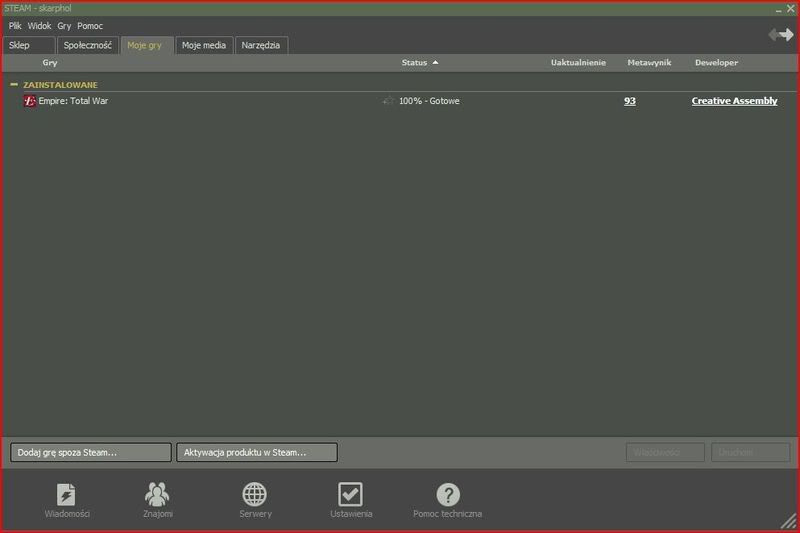 Thanks in advance! Skarphol
|
|
| Thread Tools | |
| Display Modes | |
|
|


 Hybrid Mode
