
|
|
|||||||
| Technical problems and solutions Questions and solutions |
 |
|
|
Thread Tools | Display Modes |
|
#11
 01-12-2009, 06:50 PM
|
|||
|
|||

I had the same problem too. I installed the game on my home pc and transferred the saves from my laptop. It didn't run on my home pc. Then I checked the game.ini file (it is in the My Games folder). I had accidently copied that over from my laptop as well and the first two lines with the screen resolution were incorrect for my home pc. I edited those two lines for the proper resolution and it then worked fine. I wonder if this happened to any of you.

|
|
#12
01-14-2009, 02:15 AM
|
|||
|
|||
|
still having the same problems...never changed any hardware or anything, as was suggested earlier in the thread. also, i updated to the most recent nvidia drivers...still nothing. same problems. uninstalled, reinstalled, ran as admin, ran in compatibility mode, disabled UAC...bupkus.
pretty annoyed, frankly. by the fact that i can't run the game, and by the fact that i haven't gotten even a hint of a response from anyone involved with the company. ________ Burn Notice Dicussion Last edited by Phineas; 05-09-2011 at 01:00 PM.
|
|
#13
01-14-2009, 08:33 AM
|
||||
|
||||
|
Quote:
You may also try :support(at)1cpublishing(dot)eu email - as the provider / game seller/ really can't have the resources of solving your problem IMHO (You can sent in the email link to this thread, where you have already your directx log and problem description... )
__________________
WOK pan? You sure mean WOG... Equilibrium? You sure mean Equlibris... 
|
|
#14
01-14-2009, 08:38 PM
|
|||
|
|||
|
got a new error message today when i tried starting the game. i dunno -- maybe this is progress... anyway, perhaps someone has some idea what to make of this:
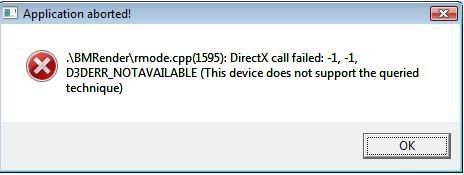 again...have an 8800 GTX with most recent driver (181.20) installed. ________ Paxil Side Effect Last edited by Phineas; 05-09-2011 at 01:00 PM.
|
|
#15
01-14-2009, 10:35 PM
|
|||
|
|||
|
Hi Phineas,
Did you try checking out the resolution set by game.ini as fortress13 suggested? I had the same problem as you, on a fresh install, and when I checked found it was trying to set my resolution to 0x0...when I manually set it to my actual resolution the game sprung to life. It's worth a look, because I also had a 8800 series card and I wonder if that's part of the cause. In any case, I hope you find your answer soon if this doesn't do the trick. Cheers.
|
|
#16
01-15-2009, 04:01 AM
|
|||
|
|||
|
My game.ini file *does* list the x and y resolutions as 0. However, the problem persists even after attempting to set them to my screen resolution of 1600x1200. I also tried 1024x768 to no avail.
________ MARIJUANA STRAINS Last edited by Phineas; 05-09-2011 at 01:00 PM.
|
|
#17
01-15-2009, 07:01 AM
|
||||
|
||||
|
Phineas: email to: support(at)1cpublishing(dot)eu
Even if I do not believe the problem is on your HW / Video card drivers side, still one question: When you reinstalled video drivers: have you first uninstalled them in save mode? (Did you uninstall also any video related software, like movie codecs, or 3D software acceleration software?) After you reinstalled both DirectX and Video Drivers, have you reinstalled the game? (and not using any patches at first try...)? Do you have many devices attached to the PC? (usb/serial/parralel/PS2/IEEE...) Do you have any programms that start at the pc start and are persistent in the background (like video/audio/input device supporting software? Some are from ADOBE, some from many retailers... sometime one may not know what is run at startup or by msconfig...) Sorry if my questions sound useless, but let's try anything.
__________________
WOK pan? You sure mean WOG... Equilibrium? You sure mean Equlibris...
|
|
#18
01-15-2009, 01:42 PM
|
|||
|
|||
|
Gatts...I appreciate your attempts to help. I have emailed support, as you suggested. Also, you asked about background processes. These are the processes running the last time I tried to run KB...do you see a conflict from any of these?
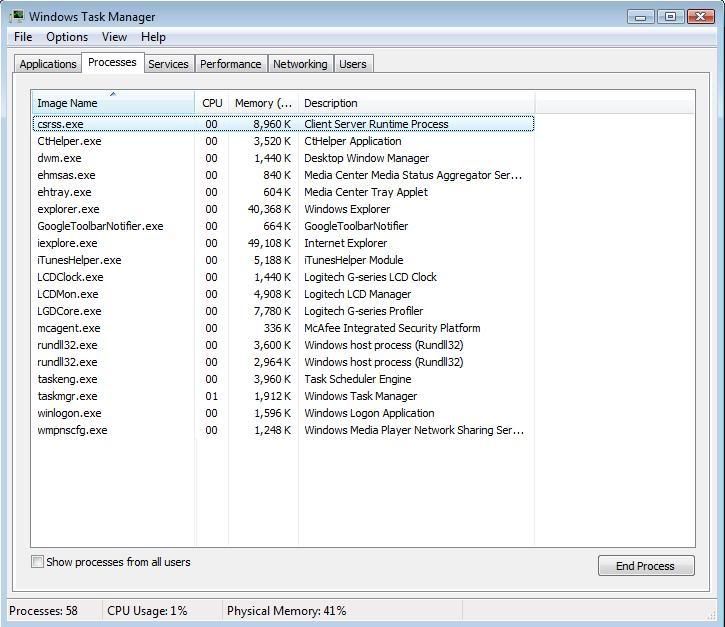 thanks for your attempts to help. ________ CHEAP GLASS PIPES Last edited by Phineas; 05-09-2011 at 01:01 PM.
|
|
#19
01-15-2009, 01:50 PM
|
|||
|
|||
|
For completeness' sake, here's my game.ini file *after* I made the resolution change suggested previously. Prior to the change, the x and y were 0. Anyone see any other potential problems? Mind you, I changed nothing after a fresh install except the resolutions.
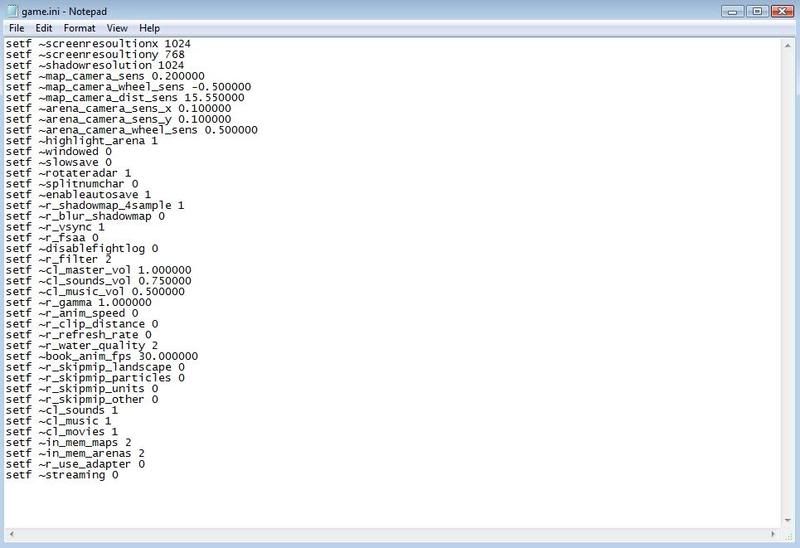 ________ VOLCANO VAPORIZER Last edited by Phineas; 05-09-2011 at 01:01 PM.
|
|
#20
01-15-2009, 04:13 PM
|
|||
|
|||
|
I've had a very similar problem. When I start up kb, nothing happens but the process is running in the task list. I solved it by running kb through 3dAnalyzer. It's a free graphics card emulator that you can download.
|
|
| Thread Tools | |
| Display Modes | |
|
|


 Linear Mode

