
|
|
|||||||
| Technical threads All discussions about technical issues |
 |
|
|
Thread Tools | Display Modes |
|
#41
 05-24-2012, 04:07 AM
|
||||
|
||||

Quote:
I placed the DX10 version in.
__________________
71st Eagle Squadron www.anon6.com - Blogger on DCS Series 71st Mastiff's You-Tube " any failure you meet is never a defeat; merely a set up for a greater come back " Asus||i7x5930k||16gb3200||GTX10808gb||ATX1200Corsa ir||CBTitanium7.1||Win10x64||TrackIr4Pro/ir||gladiator pro mkII||siatekpedals||X52Throttle||G15Keyboard/RazerMouse|| 32"LCD||2x7" lilliputs,1x9inc 
|
|
#42
05-24-2012, 08:00 AM
|
|||
|
|||
|
I'm just another end-user here, I don't know enough about how 'injectFxaa' or Cliffs Of Dover works to offer tech-support.
The only times the injectFxx files have caused my particular game setup to crash has been when I accidentally saved the 'injFX_Settings' .H File as a .txt file and when I used one of the Sepia effect colours that wasn't recognised. I was under the impression though that all previous versions of the game prior to the latest beta patch ran in DirectX9, regardless of whether a persons graphic card was capable of running in DirectX10. I'm sure that's the reason that was given for why we're still not seeing better water/beach/river effects for example (as the devs were waiting to switch fully to DirectX10 before implementing them). Edit (26/5/12) - Just for the record, and to keep from spreading misinformation, the developers spokesperson, BlackSix, just mentioned in another thread that WindowsXP, and therefore DirectX9 (which is the highest version of DirectX WindowsXP can run) will continue to be supported. So my recollections above, that the game will eventually be DirectX10 (or higher) only, aren't accurate. Last edited by Les; 05-26-2012 at 07:03 PM.
|
|
#43
05-24-2012, 05:43 PM
|
|||
|
|||
|
Before this thread fades out altogether, thought I'd mention what I found to be an interesting coincidence.
Some random Youtubing Cliffs Of Dover player made a comment yesterday on one of my video's, so while I was replying I had a look at the video myself for the first time in ages. It must have been recorded with beta patch 14413 or the official patch that followed it, whichever one introduced the 'new' propellor effects. Check out the lighting and colours in it - That's how the default game used to look almost exactly one year ago, and is the sort of look I was trying to get with my adjustments to the current version. I think I've got it fairly close to that, but check out those reflections on the underside of the plane. Wouldn't mind seeing those brought back in at some point.
|
|
#44
08-31-2012, 09:02 PM
|
|||
|
|||
|
Just thought I'd update this thread with some more settings (attached below).
These ones are designed mainly to make the sunrises and sunsets more spectacular (until it actually gets dark, when it's better to turn them off and let the default cold moonlight light things up). They're basically the opposite of my preferred settings (and even the default ones), which are very dark and blue in comparison. Here are some comparisons between the default colours and these more colourful ones. 4am   9am  6pm  7pm   8pm   8:30pm 
|
|
#45
08-31-2012, 11:08 PM
|
|||
|
|||
|
Some more shots as the sun sets, using the same settings as above, attached again below.
  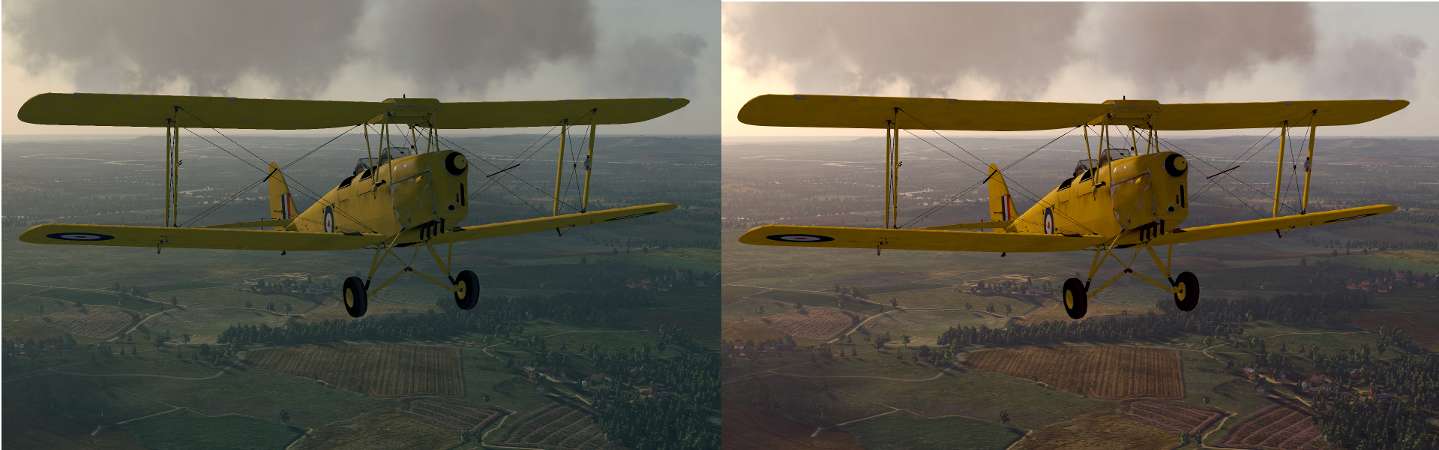             The last two shots show the point at which the default moonlight should be allowed take over from the sunlight effect, for a more natural look. Last edited by Les; 09-01-2012 at 03:52 AM.
|
|
#47
09-05-2012, 12:39 AM
|
|||
|
|||
|
Hey Les, thanks a lot for all these great color schemes, however I'm running into a problem and I'm hoping you or someone on the forum can help me out.
Personally I do not like FXAA and I really just want the tonemap function from the injector. I originally just commented out the AA option in the settings.h file and it was working last night. However, all of a sudden if I don't have the AA active, CloD won't boot and just crashes. Removing and putting back the injector doesn't fix it, but I do at least get an error in the log file. redirecting CreateDXGIFactory redirecting IDXGIFactory->CreateSwapChain D3DX10CompileFromFile failed injFX_Shaders\Tonemap.h(21,  : warning X3206: implicit truncation of vector type : warning X3206: implicit truncation of vector typed:\games\steam\steamapps\common\il-2 sturmovik cliffs of dover\shader.hlsl(75,37): error X3004: undeclared identifier 'lumaSampler' Does anyone have a better understanding of the injector and possibly know what needs to be changed? I have no idea why it was working before and now refuses to work, but I'd really love to get these much more pleasing tonemaps into CloD. Thanks!
|
|
#48
09-05-2012, 11:46 PM
|
|||
|
|||
|
Hey Al. I just tested it on my system and got the same result, game won't start with the anti-aliasing disabled, gives a similar crash log to yours (and Topo's on the previous page). I have no idea why, didn't know it was a problem. Did some searching around and couldn't find any fix that would apply to my system. Could just be a bug with the application itself. It doesn't bother me as I prefer to have the FXAA enabled anyway, but sorry it's not working out for you. I don't know of a similar post-processing utility that can be used for colour correction only.
|
|
#49
09-06-2012, 03:01 AM
|
|||
|
|||
|
Quote:
|
|
#50
09-06-2012, 04:38 AM
|
|||
|
|||
|
I read somewhere in passing that there isn't a SMAA injector that includes other filters too, like the 'injFXAA' package by 'some_dude' does, and like other FXAA/colour/effect utilities do for other games (eg. 'Skyrim', 'Rift', 'GTAIV'). From what I understand, the colour correction and other effects filters are made and exist entirely separate from the anti-aliasing ones, and have just been tweaked and put together in one convenient package, usually for specific games. So there's no reason such effects couldn't be included with an SMAA injector, but as far as I know no-one's bothered to do it.
|
|
| Thread Tools | |
| Display Modes | |
|
|


 Linear Mode

