
|
|
|||||||
| Gameplay questions threads Everything about playing CoD (missions, tactics, how to... and etc.) |
 |
|
|
Thread Tools | Display Modes |
|
#1
 11-29-2011, 11:37 PM
|
||||
|
||||
 R.A.F Markings - selecting
Hi guys,
If this question has been asked elsewhere I would be gladly be pointed to the thread. My question relates to when flying as R.A.F and selecting as an example 3 Sqdrn how does the game allocate the third letter? I'm lead to beleive that it takes the first letter of your online name. E.G: 3 Sqdrn RAF is OQ and then my first letter is S. So I appear as OQ-S ingame. What happens when two or more people have the same letter select the same sqdrn for ease of ID. I know in 1946 you could select the number to give you a certain letter. I'm yet to figure this out in Cliffs. Any ideas?
__________________
 Respect is something you earn. You can't beg, borrow or steal it http://www.raafsquad.com ------------------------------------------------------ Asus P5Q Pro/Intel Quad Core Q6600 2.4Ghz/8Gb GSkill DDR2 1066Mhz RAM/GTX460 "Goes Like Hell" 1Gb/TrackIR4/Saitek X-52 + rudder pedals/W7 Home Premium 64bit. 
|
|
#2
11-29-2011, 11:45 PM
|
||||
|
||||
|
Hi Smouch - works just like in 1946 with numbers of the alphabet in the 'a/c loadout' screen. 'S' should be 18 in he sim (wild guess)
You can also type text as a serial No. on the RAF planes so it will appear on your crate as text. I am not sure how many letters will fit though. cheers
__________________
Bobika.
|
|
#3
11-30-2011, 05:26 AM
|
|||
|
|||
|
Hi Smouch
As Robo says, you type in the number corresponding to what letter you want..Eg 1=A, 2=B and so on..this is done in the Loadout screen. For example, last night when flying with the guys, I chose a Spit 1A, Chose Regiment "No 3 Squadron RAF" and then a bit lower down in the Tail Number box I typed 14. The numbers on my plane were accordingly OQ (Roundel) N. On the left side of that loadout page, you will see a preview of your plane and as you enter a number in the "Tail number" box and/or change the Regiment, the lettering on that plane will change as well so you can see if it is working. cheers mate
|
|
#4
11-30-2011, 11:51 PM
|
||||
|
||||
|
After a bit of playing around, in the Tail Number section you can type in the letters as is A=A, S=s etc.
And on the German side of things you can enter numbers up to 999 and us some symbols as per these screen shots:   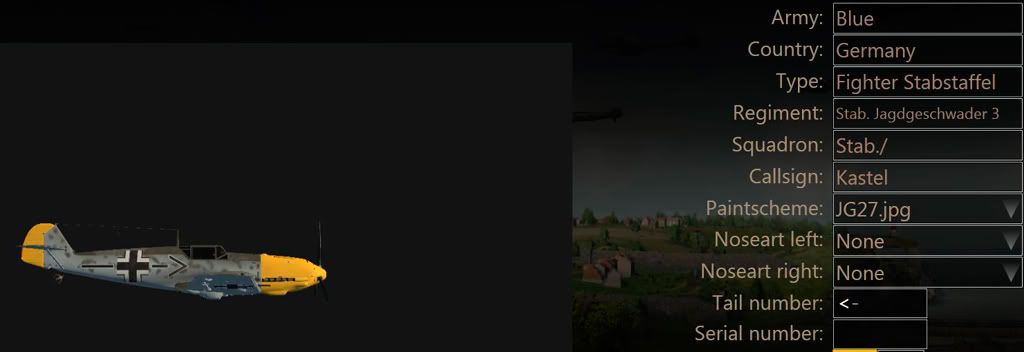 Thanks for the info guys. 
__________________
Respect is something you earn. You can't beg, borrow or steal it http://www.raafsquad.com ------------------------------------------------------ Asus P5Q Pro/Intel Quad Core Q6600 2.4Ghz/8Gb GSkill DDR2 1066Mhz RAM/GTX460 "Goes Like Hell" 1Gb/TrackIR4/Saitek X-52 + rudder pedals/W7 Home Premium 64bit.
|
|
| Thread Tools | |
| Display Modes | |
|
|


 Linear Mode

