
|
|
|||||||
| IL-2 Sturmovik: Cliffs of Dover Latest instalment in the acclaimed IL-2 Sturmovik series from award-winning developer Maddox Games. |
 |
|
|
Thread Tools | Display Modes |
|
#62
 05-20-2011, 09:23 PM
|
|||
|
|||

Quote:
 One thing ive also noticed it over london i have dissapearing/ reappearing buildings and bridges. anyone else have this problem? I do have the latest nvidia drivers 270.61. Other than that, seems a bit smoother once again. 

|
|
#63
05-20-2011, 09:28 PM
|
|||
|
|||
|
Quote:
|
|
#65
05-20-2011, 09:34 PM
|
|||
|
|||
|
I get rid of my terrible stuttering over London, I lowered Texture Quality Orginal -> High, that cures my stutter over london, smooth now.
I love the new prop, it need vSync, without it terrible tearing on it.
|
|
#66
05-20-2011, 09:43 PM
|
|||
|
|||
|
Yeah, I can confirm that this new patch runs wonders. I also love the new prop!!! I barely remember the old one LOL.
Luthier, please don't forget about the Force Feedback issue. It works fine, but it needs some high G movements before it's activated when a mission is loaded (only aileron and elevator effects, machine gun effects always work). Also, during the flight sometimes those aileron and elevator effects are disabled until some high G movements are done again. Thanks for the continued support,
|
|
#67
05-20-2011, 09:49 PM
|
|||
|
|||
|
Quote:
Lowered Texture Quality Orginal -> High, i get this way really smooth fly over london rooftops.
|
|
#68
05-20-2011, 09:54 PM
|
|||
|
|||
|
game is smootehr now but I lost sound twice in multiplayer...completely
|
|
#69
05-20-2011, 09:55 PM
|
|||
|
|||
|
Just ran the game with the latest hotfix, and did a test above London (all maxed out, SSAO on, 1920x1200). There is something strange, the memory usage goes up indefinitely, I've stopped the flight at 2835 MB of load. Matter for Luthier
 . Here is the Afterburner screenshot: . Here is the Afterburner screenshot: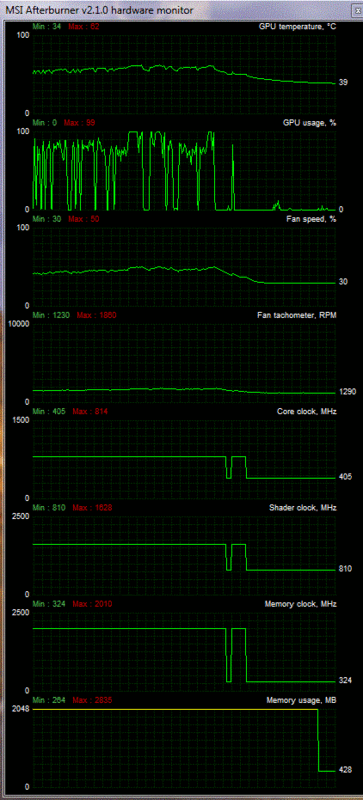
|
|
| Thread Tools | |
| Display Modes | |
|
|


 Linear Mode

