Fulqrum Publishing Home   |   Register   |   Today Posts   |   Members   |   UserCP   |   Calendar   |   Search   |   FAQ

Go Back   Official Fulqrum Publishing forum > Fulqrum Publishing > IL-2 Sturmovik: Cliffs of Dover

IL-2 Sturmovik: Cliffs of Dover Latest instalment in the acclaimed IL-2 Sturmovik series from award-winning developer Maddox Games.

Reply
 
Thread Tools Display Modes
  #1  
Old 04-15-2011, 11:13 PM
JG14_Jagr JG14_Jagr is offline
Approved Member
 
Join Date: Mar 2011
Posts: 433
Default

Quote:
Originally Posted by seaeye View Post
I can now start Me109 without selecting magnetos using CEM difficulty setting. Just fuel cock, then ignition..
You could before..the I key would do that automatically..
__________________
MSI P67A-65D
Intel i5 2500K @ 4.2 Gig
8 Gigs Corsair DDR3 1600 RAM
XFX 6970 Video Card
Win7 64 Bit Home Ed
ATI 12.3 Driver Package
WD Caviar 7600 RPM HDD
ATI CCC at DEFAULT settings
Reply With Quote
  #2  
Old 04-15-2011, 11:47 PM
klem's Avatar
klem klem is offline
Approved Member
 
Join Date: Nov 2007
Posts: 1,653
Default

=========================
EDIT:
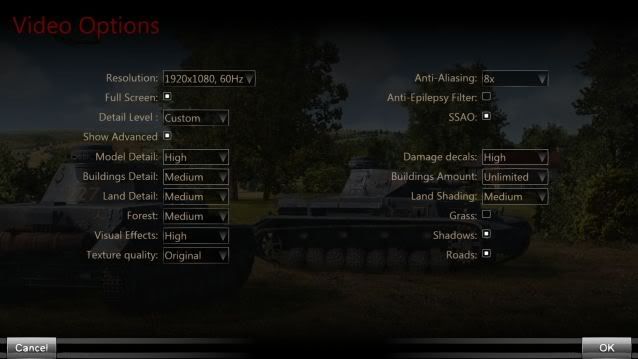
My original settings (first patch) were High with Building detail set to Medium, Forest set to low, Buildings Amount set to Medium, Grass Off, Shadows Off.

This gave me 25-35fps low over London with occasional short dips below 20 and minor stutters as major features loaded.

Generally this patch, with SSAO checked and Textures at original (= previous settings?) has improved frame rates by removing the lower end low over London as it dosen't fall below about 35 although the upper 35 has only increased to about 38-40. A general improvement of about 5-10 fps with the bottom end raised.

So on these settings the patch gives me (all at Rooftop level over London):
Suburb Rooftops 35-38 (was 25-35)
Approaching Tower Bridge over the Thames ~37
Through Tower Bridge ~34
Approaching Houses of Parliament ~38
Over rooftops of Houses of Parliament~38 with a 14fps spike right alongside Big Ben
Over Buckingham Palace ~29

As new distant textures loaded for Tower Bridge, Houses of Parliament, Buckingham Palace there were spike drops in fps, too quick to measure but probably down to around 20.

================================

Tried Very High settings.
Approx 20-25 over London, occasional drops to 10-11 as some majore features loaded like Houses of Parliament.

Then tried:
High settings, except Forest low, Buildings Amount Medium, Grass etc on, SSAO Unchecked, Textures High, AAx4
AFx8
AA Gamma Correction OFF
AA Transparency OFF
CUDA GPUs - ALL
Max Pre-rendered frames - 3
Single Display
Power Managment - Max Performance
Texture Filtering LOD Bias CLAMP.
Texture Filtering Quality - Quality
Texture Filtering - Trilinar Optimisation - ON
Threaded Optimistaion - AUTO
Triple Buffer ON
Texture Filtering Aniso Filter optimisation - OFF
Vert Synch ON

ASUS Sabertooth mobo
i7 950 @ 4GHz
6Gb DDR3 RAM
EVGA GTX570 GPU
850W PSU
Coolermaster HAF912+ case
Samsung 22" 226BW @ 1680 x 1050
X52 HOTAS
X45 miscellaneous controls

EDIT: Samsung 226BW 22" 1680x1050

FPS, London low level (rooftops):
Suburbs ~35
Approaching Tower Bridge ~24
Through Tower Bridge ~35
Approaching Houses of Parliament 25-35
Over Roofs of Houses of Parliament 30 with a spike of 17 exactly at Big Ben
EDIT: Slightly lower than those Edited in above for my old settings even though Textures were Medium and SSAO unchecked but the Grass and Shadows were Off.

Quick Missions:-
Country Terrain 6,500 feet 65-75
Country Terrain 200 feet 40-50
Water 6,000 feet ~80
Water 200 feet ~60

During the first test run the sound went intermittent after about 6-8 minutes. It restored when I re-loaded the same mission. Didn't happen again.
==========
EDIT:
Final Settings:
Very High, Building Detail Medium, Forest Low, Buildong Amount Medium, Grass Off, all low level ~ rooftop height
Low over normal Terrain ~37
Low over medium-high forest concentration 31-37
Suburb rooftops 26-28 with a spike to 22
Approaching Tower Bridge ~24
through Tower Bridge 24-30 with a spike at 19
Approaching roofs of Houses of Parliament 27-30 with a spike to 17 over roofs (in Westerly direction) and a spike to 15 exactly alongside Big Ben (in Easterly direction)

General fps is good, smooth over london except the spikes when some textures load.
__________________
klem
56 Squadron RAF "Firebirds"
http://firebirds.2ndtaf.org.uk/


ASUS Sabertooth X58 /i7 950 @ 4GHz / 6Gb DDR3 1600 CAS8 / EVGA GTX570 GPU 1.28Gb superclocked / Crucial 128Gb SSD SATA III 6Gb/s, 355Mb-215Mb Read-Write / 850W PSU
Windows 7 64 bit Home Premium / Samsung 22" 226BW @ 1680 x 1050 / TrackIR4 with TrackIR5 software / Saitek X52 Pro & Rudders

Last edited by klem; 04-16-2011 at 08:02 AM. Reason: Old data added for comparison
Reply With Quote
  #3  
Old 04-16-2011, 12:14 AM
MAF MAF is offline
Registered Member
 
Join Date: Apr 2011
Location: Argentina
Posts: 6
Default

Sry for my english, the patch WORK AMAZINGG!!!!!!, THANKS MANY THANKS.

With:

1920x1080-60Hz

All setting in High, excetp, building=Medium, Landscape=MEDIUM, LandscapeShadows=MEDIUM, Grass=OFF, SSAO=Unchecked, and Antialiasing 8X

Tested in Multiplayer/Volcanic Islands/ 60 Fps in cokpit - 80/90 incokpit in air, 80/100 External camera.

Tested in singleplayer Fly over France in Bf109 60 Fps in air, 40/50 Over buildings, NO MORE STTUTERS, the simulator run Perfect Smoothly.

My Specs:

Asus M3N HD-HDMI, AMDx4 Q9950 BE O.C. @3,1Ghz, Gskill Extremme 2x2Ghz O.C. @ 910 Dual Channel Lat. 4-4-4-12, ATI XFX 5850 O.C. @Core 765/Mems. 1115

THANKSSSSSSSSSSS!!!!!!!!!!!!!!!!
Reply With Quote
  #4  
Old 04-16-2011, 12:19 AM
hanuristi hanuristi is offline
Registered Member
 
Join Date: Apr 2011
Posts: 7
Default

Less stuttering for me and generally improved performance but the stuttering is not completely eliminated. And ugly single color block houses now. That nomipmap mod still removes almost all the stuttering though
Reply With Quote
  #5  
Old 04-16-2011, 12:20 AM
flyingblind flyingblind is offline
Approved Member
 
Join Date: Oct 2009
Posts: 255
Default

A very noticable improvement. System specs are:

Asus M4N98TD EVO NF 980a SLI AM3 Motherboard
Phenome II 965 Quad Core
Asus Nvidia GeForce GTX 560 Ti
4gb DDR3
Windos 7 Ultimate

I have been trying it out with everything set to the maximum except for building details which is set to low.
Grass, roads and forest on.
AA set to 8x and process affinity mask=14.
Anti Epilepsy and SSAO unchecked.

Over sea fps ave 50
Tree top level including over towns like Dover fps ave 27 - 30.
Mixing in dogfights and against bombers the sim is always very playable with fps between high 20s up to 85.
Almost no stuttering.

CPU usage gone from 20% up to 50% or more. Usage was around 40% on core 0 and 30% on other three and is now 90% on core 0, 50% on core 1 and 20% on 2 and 3.

Memory usage has gone from 2.5Gb or less to 3.1Gb.

The landscape looks just excellent.

London sightseeing struggles a bit and really needs the settings turning down which is fair enough as my system specs are not top notch by any means.

Bomber intercept over London struggles even more with big freezes especially at the mission start when CPU usage drops to zero for several seconds.

So thanks Luthier, it's definately getting there.

Last edited by flyingblind; 04-16-2011 at 12:28 AM.
Reply With Quote
  #6  
Old 04-16-2011, 12:24 AM
Helrza Helrza is offline
Approved Member
 
Join Date: Sep 2010
Location: Sydney Australia
Posts: 214
Default

Thanks for the patch luthier and company

Massive improvement over stuttering even with a dual core everything on full but the only thing i cant run is the shadows, but i think a quad core will be the remedy for tat little prob Thanks again for ur hard work!
Reply With Quote
  #7  
Old 04-16-2011, 12:03 AM
Catseye's Avatar
Catseye Catseye is offline
Approved Member
 
Join Date: Aug 2010
Posts: 242
Default

Well done guys,
Flying quick mission: Hurricane bomber intercept low level over water.
Much smoother. No Stutters. Graphical settings are higher than before.

EDIT: I have put all graphic settings on high and turned on AA to 8, reduced buildings amount to medium and forest to low. Still very acceptable playability in free flight I have to test these settings in combat.

All cores and threads are showing active except for thread of core 3.
Affinity Mast set to default. Tested at 14 but visually no difference in performance.

Very encouraged by this,
Thanks

System Specs.
Windows 7 Home, Intel I7 920 @ 3.4 Ghz, memory 6144 MB RAM, Page file: 1.9 Gb, DX11., GPU Nvidia 275.

Last edited by Catseye; 04-17-2011 at 02:52 PM.
Reply With Quote
  #8  
Old 04-15-2011, 07:06 PM
Derinahon Derinahon is offline
Approved Member
 
Join Date: Apr 2011
Location: Hertfordshire, UK
Posts: 105
Default

:BIG FROWN:

So, it looks like I'm never getting rid of this stuttering. It doesn't matter what settings I use, the flippin' game wrecking stutters are always present. Even with everything set to low or off, the game splutters along over land.

Frame rate seems a little higher. Flying low over Dover with medium/high settings, shadows and SSAO: min 28, average 48, max 65 (100+ looking up) @ 1680x1050.

CPU usage is now higher on cores 2, 3 and 4 than in previous versions, but no core is getting anywhere near 100%. The GPU clocks are fully ramped up and it's 100% utilised.


PS. I much prefer the original tachometers

Last edited by Derinahon; 04-15-2011 at 07:10 PM.
Reply With Quote
  #9  
Old 04-15-2011, 07:13 PM
Wolf_Rider Wolf_Rider is offline
Approved Member
 
Join Date: Dec 2007
Location: Sydney, Australia
Posts: 1,677
Default

Quote:
Originally Posted by Derinahon View Post
:BIG FROWN:

So, it looks like I'm never getting rid of this stuttering. It doesn't matter what settings I use, the flippin' game wrecking stutters are always present. Even with everything set to low or off, the game splutters along over land.

Frame rate seems a little higher. Flying low over Dover with medium/high settings, shadows and SSAO: min 28, average 48, max 65 (100+ looking up) @ 1680x1050.

CPU usage is now higher on cores 2, 3 and 4 than in previous versions, but no core is getting anywhere near 100%. The GPU clocks are fully ramped up and it's 100% utilised.


PS. I much prefer the original tachometers
uncheck the SSAO checkbox and do the same for the Eilepsy Filter checkbox
__________________
Intel 980x | eVGA X58 FTW | Intel 180Gb 520 SSD x 2 | eVGA GTX 580 | Corsair Vengeance 1600 x 12Gb | Windows 7 Ultimate (SP1) 64 bit | Corsair 550D | Corsair HX 1000 PSU | Eaton 1500va UPS | Warthog HOTAS w/- Saitek rudders | Samsung PX2370 Monitor | Deathadder 3500 mouse | MS X6 Keyboard | TIR4

Stand alone Collector's Edition
DCS Series


Even duct tape can't fix stupid... but it can muffle the sound.
Reply With Quote
  #10  
Old 04-15-2011, 07:16 PM
Binni Binni is offline
Registered Member
 
Join Date: Apr 2011
Posts: 3
Default

Hello,

CLOD runs a lot better now, thank you very much, but one question luthier told us there would be some improvements to QMB (From Luthiers anoouncement: "6. Improvements to the Quick Mission Builder feature.").
I haven´t seen any, I had hoped for corrected skin/loadout options?
Reply With Quote
Reply

Thread Tools
Display Modes

Posting Rules
You may not post new threads
You may not post replies
You may not post attachments
You may not edit your posts

BB code is On
Smilies are On
[IMG] code is On
HTML code is Off

Forum Jump


All times are GMT. The time now is 12:32 PM.


Powered by vBulletin® Version 3.8.4
Copyright ©2000 - 2025, Jelsoft Enterprises Ltd.
Copyright © 2007 Fulqrum Publishing. All rights reserved.