
![]() |
|
|||||||
| Performance threads All discussions about CoD performnce |
![]() |
|
|
Thread Tools | Display Modes |
|
|
|
#1
|
|||
|
|||
|
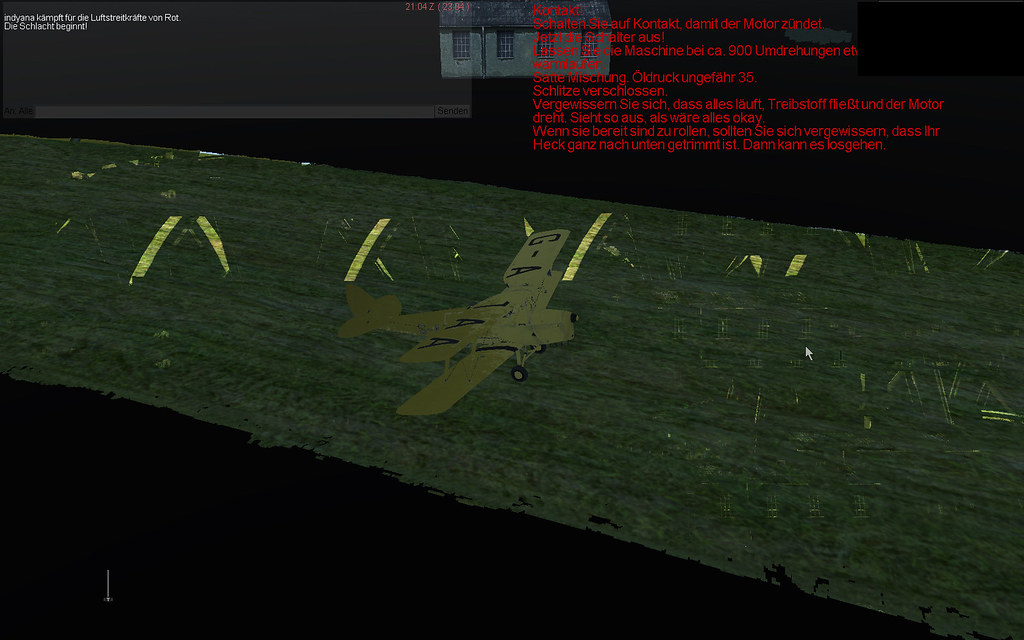
Hi All
, as promised here a few pictures about my Graphic Problems with Windows XP SP3, Nvidia Drivers 270.xx ![]() As you can see, its not pretty at all Lps_Indyana |
|
#2
|
||||
|
||||
|
I read else where if your using XP to turn off the grass.
I guess some guys are crashing at 95% even with it on.
__________________
JO Top Gun 2009/2010 ![]() In the heat of battle you will not rise to the occasion You will shrink to the level of your training Music at Reverbnation |
|
#3
|
||||
|
||||
|
Quote:
Set the game on low or very low! You should fix it but you'll get this graphic: Acthung Spitfire! This game is a dream! ![]() I have also many problems in thecockpit like clouds, tracers crossing it and some other problems. I'm forcing myself to stay quite, but is very hard. Last edited by 150GCT_Veltro; 03-31-2011 at 07:28 PM. |
|
#4
|
|||
|
|||
|
Veltro yours looks better then my in very Low
![]() Lps_Indyana |
|
#5
|
|||
|
|||
|
Running XP SP2 here and I don't seem to be getting any self shading/shadowing (whatever you call it), just the gradual dimming of parts which aren't exposed to the sun. There are screens a few posts up showing self shading on XP so I'm pretty confused as to why it doesn't work on my pc...
Any ideas anyone? Last edited by burlaff; 03-31-2011 at 08:32 PM. |
|
#6
|
|||
|
|||
|
Yes, for WinXP users, with the patched version, if your game stops at 95% while loading a mission, you must turn Grass OFF
I have a strange problem with the patched version: I have to turn Grass OFF because I run WinXP. Since, the sea looks very strange: The solution is there if you only change one setting: Change Forest = NONE I hope this helps some WinXP users like me.... I have this from somebody else who mentioned it in a thread, unfortunately did not keep his name (nor the thread) Last edited by 335th_GRAthos; 11-24-2011 at 10:43 AM. |
|
#7
|
||||
|
||||
|
I´ll try it...
__________________
JG2 Spitfire Trinken für den Frieden - Schmiedet Schwerter zu Zapfhähnen !!! System Asus M4A89GTD PRO/USB3 |AMD Phenom II X6 Black Edition 1090T 6x 3.20GHz | 8GB RAM DDR3 | Sapphire HD6950 2048MB | 2x Samsung 750GB Raid0 |Windows 7 Home Premium x64 | HOTAS Cougar | Simped Vario Pro |TrackIR 2 |
|
#8
|
|||
|
|||
|
Hi,
Installed COD over the weekend. Initial experience was quite frustrating, graphic corruption, CTDs. Once I read the forums and began tweaking (forest & grass off, affinity mask, etc.) things have improved considerably. I’ve found that turning off AA/AF and changing to performance settings on card increased FPS at the expense of further graphics corruption. So what’s working best now is keeping texture setting on quality, turning AA and AF down to 2x and vsync on. I can now play the quick missions. Regular missions are still problematic. Over water I average 30-40 fps and over land about 10 fps less. There is some stuttering in either case. Strangely, lowering the number of default planes doesn’t seem to have a tremendous affect on frame rate. My home-built PC: Gigabyte GA-G31M-ES2L P4 (Pressler) OC@3.84Ghz 4GB RAM (~3.25) GTX 260 W/270.51 beta driver Acer 22” @ 1680X1050 WinXP SP3 |
|
#9
|
|||
|
|||
|
Quote:
i have the exact same problem and cant get it to workm i also have the green sea and random bluescreens system spec: Win Xp MCE Sp2 AMD Athlon X2 7750 2.7ghz 4Gb DDR2 800Mhz (only 3.25Gb useable due to win xp) nVidia GTX 460 and 266.58 drivers |
|
#10
|
|||
|
|||
|
Hi Folks
I had the green sea problem with XP my fix - that I found all by myself !.... in the config.ini change VisibilityDistance=3 into VisibilityDistance=2 this should fix the 'green sea' I've switched forest off and grass off and shadows off but have model detail high and the rest medium....over water FPS is good even with 6 Vs 6 dogfight. Over land not as good, but have managed to fly the first 2 missions of RAF campaign. . |
![]() |
| Thread Tools | |
| Display Modes | |
|
|