
|
|
#35
 02-09-2017, 12:25 PM
|
||||
|
||||

Quote:
G'day Mike For me it only happens if you re-enter the arming screen before or after a mission, the is no problem with the skin in the mission just in the arming screen. My sequence to make the issue occur 100% of the time: 1. Load sim 2. Open QMB 3. Select U-2VS (LNB) 1942 (nation or side does not make a differnce) 4. Enter arming screen 5. Select skin summer44.bmp select (skin displays correctly in spin window), select apply. 6. After returning to main setup screen re-enter the arming screen, when arming screen opens the aircraft is in the spin window but now is devoid of any skin (with the exception that the game generated markings and pilot skins, machine gun and the cockpit interior seem to be unaffected as seen below). 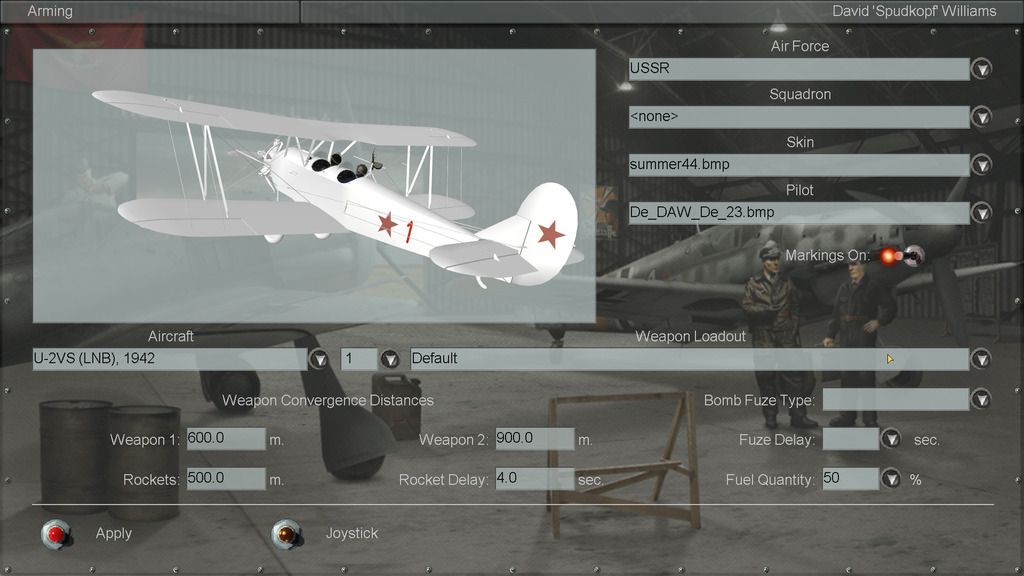 PS. Check PM log file sent.
__________________
Spud 
Last edited by KG26_Alpha; 02-09-2017 at 11:04 PM. Reason: https:// removed 
|
|
|


 Threaded Mode